
What Causes Microphone Feedback in Church (And How to Stop It)
Table of Contents
I didn’t learn church sound from a textbook. I learned it the way most worship leaders learn it — through trial, error, and a father who had old DJing equipment collecting dust in the house.
When I stepped into my first music director role fresh out of college — taking over from my grandmother, who had decided it was time to step down — the church’s sound situation needed work. My father donated some of his old gear, bought a set of speakers, and then the two of us took a trip to the local music store and asked the guy behind the counter what microphone we should be using for live vocals. We had no idea what we were buying. He pointed us to the Shure SM58. We bought several. (Affiliate link — still the mic I’d recommend to any church starting from scratch.)
What we didn’t know at the time was that we’d just purchased one of the most dependable live vocal microphones ever made. My father picked one out from the box — specifically the one with no on/off switch — and handed it to me. “This one’s yours,” he said. I still have it.
The first thing we set out to fix was the feedback. And the first thing I noticed was that the culture in most of the churches I’d experienced was the same: turn everything up. Volume on everything, all the time. I made a different call. I wouldn’t want to sit through a service blasted with a wall of music, and neither would the older members of our congregation. So we cut it. We set the levels to something reasonable, designated one SM58 as the primary mic for soloists, used the others for backup singers and room presence, and focused on making sure the choir could hear themselves clearly enough to sing with confidence.
The congregation noticed. For the first time, people told us they could actually join in — they weren’t just being performed at. The choir welcomed it too.
The formal training came later. Years into ministry, I had the privilege of singing with Joe Pace and his group at a worship conference. What struck me wasn’t just the music — it was the stage. It was quiet. The musicians could talk to each other between songs. Joe could give instructions without raising his voice. Everyone was comfortable and focused. That’s when I understood what a properly set stage actually felt like, and I’ve carried that standard with me to every church I’ve served since.
We didn’t have monitors in those early years — a limitation I later corrected. Both the in-ear kind and the wedge monitors that feel like they weigh forty pounds apiece changed how a worship team functions entirely. But that quiet, comfortable stage Joe Pace’s team had built taught me something before any monitor ever could: the best church sound isn’t the loudest. It’s the most controlled.
Every church sound volunteer knows the feeling. The service is going smoothly, the worship team is locked in, and then — that sound. A sharp, piercing squeal cuts through the room. Heads turn. The congregation winces. The pastor looks over. And whoever is behind the sound board wants to disappear into the floor.
Microphone feedback is one of the most common and most preventable problems in church audio. It happens across every size of church — from a 50-seat chapel to a 2,000-seat sanctuary. And in most cases, it isn’t a sign of bad equipment. It’s a sign of a setup problem that can be fixed.
This guide explains exactly why feedback happens in churches, what’s causing it in your specific room, and how to stop it — both in the moment and for good.
Key Takeaways
- Every time you double the number of open microphones, you lose roughly 6 dB of gain before feedback — a core principle of acoustic engineering (Audio Engineering Society) that means four open mics gives you far less headroom than one.
- Microphone feedback is a loop: the mic picks up sound from the speaker, the system re-amplifies it, and the cycle repeats until you hear that squeal.
- Churches are especially prone to feedback because of large reverberant rooms, hard surfaces, and high ceilings that reflect sound back into open microphones.
- The five most common causes are mic placement, gain set too high, room acoustics, wrong mic pattern, and too many open mics open at once.
- Most church feedback problems are solved with positioning and gain control — not expensive equipment.
What Is Microphone Feedback?
Microphone feedback is an audio loop. The microphone picks up sound from a loudspeaker, sends that sound back through the system, which amplifies it and plays it through the speaker again, which the microphone picks up again — louder this time — and the cycle keeps building until it becomes the squeal or howl you hear in the room.
It happens fast. Once the loop starts, the system has no way to break it on its own. The sound keeps getting louder every cycle until something — usually the system’s gain limit or a quick move from the sound operator — interrupts it.
Feedback is not random — it targets the specific frequencies where your room, speakers, and microphone create the most efficient loop. That’s why it almost always sounds like a single pitch rather than noise. Your room, your speakers, and your mic are conspiring at that one frequency to let the loop through.
Why Are Churches Especially Prone to Feedback?
Not all rooms are equal when it comes to audio feedback. Churches present a challenging combination of factors that make feedback easier to trigger than most other venues (FDB Pro Audio).
Large, open spaces give sound more room to travel and bounce. High ceilings create long reflection paths that can find their way back to an open microphone from angles you wouldn’t expect. Hard surfaces — stone floors, tile, glass windows, concrete walls, wooden pews — reflect sound rather than absorbing it, keeping the room loud and live even when the source has stopped.
Add to that the typical church audio scenario: multiple microphones open simultaneously for a worship team, vocal monitors onstage that push sound toward the performers, and congregations that expect high volume for praise and worship. All of those factors narrow the margin before feedback starts.
Understanding this is important because it means the solution isn’t always to buy better gear. It’s to understand your room and work with it.

What Are the 5 Most Common Causes of Mic Feedback in Church?
1. The Microphone Is Too Close to or Pointed Toward a Speaker
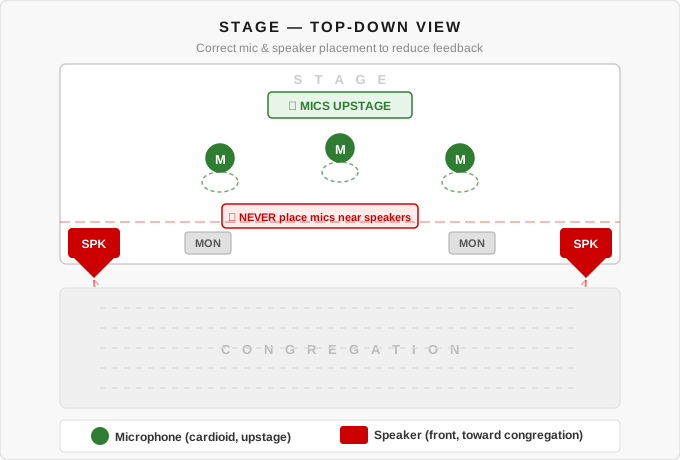
This is the most direct cause of feedback. When a microphone can hear the speaker it’s feeding, the loop has a short, easy path to travel. Handheld mics that drift toward the main speakers during worship, wireless packs clipped to belts near floor monitors, and choir mics positioned too close to the mains all create this problem (Church Tech Today).
The fix is physical: keep microphones behind and away from loudspeakers whenever possible. The direction the speaker is pointing matters just as much as the distance.
2. The Gain or Overall Volume Is Set Too High
Every sound system has a threshold — a point where the gain is high enough for the mic to hear the speaker and start the loop. Push gain past that threshold and feedback becomes unavoidable, no matter what else you do (Musicademy).
Church sound volunteers often push gain too high because the pastor or worship leader isn’t loud enough at the source — they’re holding the mic too far from their mouth, or speaking softly. The instinct is to turn it up at the board. The better instinct is to bring the source closer to the mic first, then adjust gain from there.
3. The Room Has Too Many Hard, Reflective Surfaces
Stone, glass, tile, wood, and plaster all reflect sound. In a room with multiple hard surfaces, the speakers are effectively bouncing audio back toward the stage from every direction — including toward open microphones. The room itself becomes part of the feedback path (FDB Pro Audio).
This is why feedback problems often get worse in historic church buildings with stone walls, and why adding carpet, acoustic panels, or soft furnishings can make a real difference to feedback headroom.
4. The Wrong Microphone Pattern for the Space
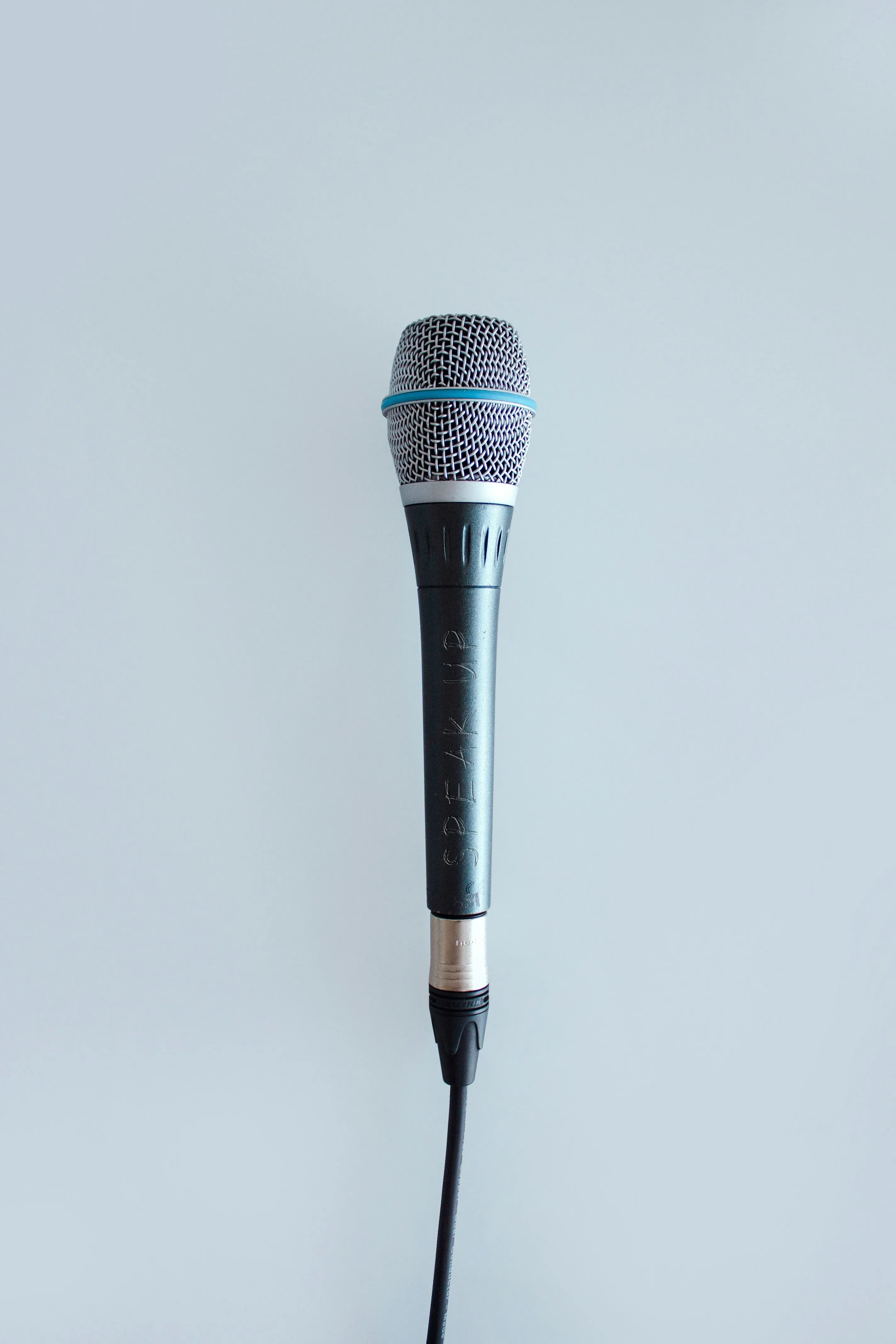
Not all microphones pick up sound from the same directions. An omnidirectional microphone picks up sound equally from all sides — which means it also picks up speakers from all sides. A cardioid microphone (the most common pattern for live vocal use) rejects sound from behind, which helps keep the speaker out of the mic’s sensitive zone (Church of Jesus Christ Tech Forum).
Using an omnidirectional or wide-pattern mic in a reflective room with speakers nearby is asking for feedback. Directional microphones — cardioid or supercardioid — are almost always the right choice for live church audio.
5. Too Many Microphones Open at the Same Time
Every open microphone lowers the system’s headroom before feedback. Audio engineers use a well-established rule: every time you double the number of open microphones, you lose roughly 6 dB of gain before feedback — a principle documented in acoustic engineering literature and widely cited in live sound practice (Audio Engineering Society; Attaway Audio). That means four open mics gives you significantly less room than one — even if only one person is speaking at a time.
Many church setups leave every channel open for the entire service. Closing unused microphones — muting the pastor’s mic during worship, muting the choir mics during the sermon — is one of the simplest ways to recover headroom and reduce feedback risk.
How Do You Prevent Microphone Feedback in Church?
Preventing feedback is mostly about getting your physical setup right before you touch an EQ or feedback suppressor. Here are the most effective steps, in order of impact:
Position microphones correctly. Mics belong in front of the person speaking or singing, with speakers behind and to the sides — not in front of the mics. This single adjustment eliminates more feedback problems than any processing or equipment upgrade (Church Tech Today).
Move the mic closer to the source. The closer a mic is to the person speaking, the less gain you need at the board. Less gain means more headroom before feedback. Coach singers and pastors to hold handheld mics close to the mouth — not at chest level — and the difference is immediate (Attaway Audio).
Use directional microphones. For live vocal and speech applications, cardioid or supercardioid microphones reject rear-facing sound and significantly reduce the chances of picking up speakers or room reflections. Avoid omnidirectional mics in live church environments.
Lower stage volume. Loud stage monitors are one of the most common causes of persistent feedback in worship settings. If the worship team is asking for more in their monitors, try lowering the overall stage volume first and using IEMs (in-ear monitors) where possible. Every decibel of stage volume you remove is a decibel of headroom you gain.
Close unused microphones. Mute channels that aren’t in use. Keep only the microphones that need to be live at any given moment open. This is one of the easiest habits for church sound volunteers to build and one of the highest-impact changes you can make.
Use EQ and feedback suppression as a last step — not a first. Once your physical setup is right, EQ can help you cut the specific frequencies your room tends to feed back at. Run the room carefully with a process called “ringing out the system” before service to find those frequencies. Feedback suppression hardware and software can help, but they can’t compensate for fundamental placement problems (Church Tech Today).
What Should You Do When Feedback Happens During a Service?
My sound team is trained to identify the source immediately — not panic, not pull random faders, but look at the feedback meters and determine which microphone is causing the loop. We run three distinct monitor mixes, so isolating the problem is a matter of knowing your board. We adjust on the fly, then — and this is the part most teams skip — we save the scene to the digital board so that same situation doesn’t repeat next Sunday. Over time, we’ve built a system we actually understand. Getting feedback these days is a rare occurrence. That didn’t happen by accident. It happened because we treated every incident as a lesson and saved what we learned.
When feedback hits during a live service, the priority is to break the loop fast without making it worse. Here’s the right sequence:
- Lower the master volume or the channel fader — not the mic gain. A quick pull on the fader breaks the loop immediately.
- Identify which mic is feeding back — usually the one closest to a speaker or the one with the highest gain.
- Address the physical cause before bringing the level back up. Move the mic, reposition the performer, or lower the monitor.
- Do not panic-mute everything at once — especially during a song. Break the loop cleanly on the problem channel, then bring the rest back.
The most common mistake is to grab the nearest fader and pull. If that fader is the wrong channel, you’ve muted someone mid-sentence and the feedback is still happening.
Church Microphone Feedback Prevention Checklist
Use this before every service:
- All main speakers positioned in front of the microphone lines
- Stage monitors angled away from open microphones
- Mic gain set conservatively — add only what’s needed
- Unused microphone channels muted
- Handheld mics confirmed close to mouth, not held at chest
- Directional (cardioid) mics in use for all live vocal and speech
- Room EQ run and problem frequencies identified
- Feedback suppressor (if used) calibrated for the room
Frequently Asked Questions
What is the most common cause of microphone feedback in church?
The most common cause is a microphone positioned too close to or pointed toward a loudspeaker, combined with gain set too high. According to Church Tech Today, correcting mic placement alone resolves the majority of recurring church feedback problems without any equipment changes.
Why does my church get feedback even at low volumes?
Low-volume feedback usually points to a room acoustics problem — hard, reflective surfaces that bounce sound back into open microphones at levels high enough to trigger the loop even without aggressive gain. Adding soft surfaces, acoustic panels, or carpet can meaningfully raise the feedback threshold in reverberant spaces.
Does a feedback suppressor fix the problem permanently?
Feedback suppressors help, but they treat symptoms rather than causes. A suppressor identifies and cuts the frequency that’s feeding back — but if the underlying setup problem (mic position, gain staging, open mics) isn’t fixed, the suppressor will continue fighting the room every service. Fix the physical setup first, then add processing as a safety net.
Is wireless microphone feedback different from wired?
The feedback loop works the same way regardless of whether the mic is wired or wireless. Wireless systems can introduce additional variables — interference, signal dropout, battery issues — but the feedback mechanism itself is identical. Wireless mics are just as prone to feedback as wired mics if positioned incorrectly or run with too much gain.
How do I “ring out” a sound system before a church service?
Ringing out means slowly raising the system gain until you hear the first hints of feedback, then cutting those frequencies with your EQ — typically a narrow notch cut of 3-6 dB. You repeat this process, inching the gain up and cutting problem frequencies, until you’ve built several dB of headroom above your service operating level. This process maps your room’s acoustic problem spots and lets you run the system higher without hitting feedback during the service.
What Happens When You Get It Right
Fast forward some years. I was hired at a larger church — and during the interview, they actually mentioned that their sound needed work. I told them the truth: I wasn’t an expert, but I was committed to learning and would help make the adjustments. They were already ahead of the game with better equipment, including a full digital board. I kept the same principles I’d always carried. Quiet stage. Comfortable room. No wall of sound.
For about two months, my team and I tinkered with the board every Sunday, made small adjustments, and saved our presets after each service. Week by week, it started to feel right.
The moment of validation came years later, during a special event — a friend and worship pianist celebrating his 80th birthday at our church. A lot of familiar faces came out, and several gospel bands showed up to perform. If you’ve ever worked sound at a multi-group gospel event, you know what usually happens: every group walks in, signals to the sound booth that they need more juice, and inexplicably, someone turns up the mains. The room gets louder. The feedback risk climbs. People in the congregation start shifting in their seats.
Not this time.
When the groups indicated they needed more, we turned up the monitors — not the mains. We gave them what they actually needed: the ability to hear themselves clearly on stage. The room stayed comfortable. Nobody was blasted. And afterward, we received compliments from musicians and attendees who were genuinely surprised — not just at how it sounded, but at how it was managed. Several people asked for our contact information. They wanted us to come train their own sound teams.
That’s when I knew we were on the right track.
A Final Word
Microphone feedback is almost always a setup problem, not an equipment problem. The room, the microphone, and the speakers are working against each other — and the fix is almost always physical before it’s technical.
If your church struggles with feedback regularly, start with the checklist above. Position the mics correctly, close what isn’t in use, bring the source closer to the mic before reaching for gain, and understand what your room is doing. Most feedback problems improve dramatically without spending a dollar on new gear.
For more on building a strong church audio foundation, see what it actually means to lead worship well — sound is the foundation that either supports or undermines everything the worship leader is trying to do. And if you’re building out your guitarist’s rig alongside your PA, the best delay pedals for worship guitar is worth a read too.
A Prayer for Your Church Sound Team
Father, bless every church sound volunteer and worship team member who serves faithfully behind the board and in front of it. May their preparation be thorough, their setup be clean, and their Sunday mornings be free of the squeal. And in the moments when it doesn’t go perfectly — as it sometimes won’t — give them the calm and the wisdom to recover gracefully and keep the congregation in worship. Amen.
Be Blessed,
Mark Claiborne

Find this helpful?
Writing takes time. If Worship Frontier has been useful to you, buying me a coffee means a lot — and keeps this going.
Join the Conversation
Comments are moderated — approved ones are posted periodically.
Thanks for your comment — it's in the queue for review.